Idle

Omatalk reads your selection out loud through a local neural voice, streamed batch by batch as it's synthesized. No network call, no API key, no cloud round-trip. The model stays warm on your own CPU.
Omatalk has two parts: the Daemon, which does the speaking, and the bar plugin, the megaphone and voice panel. One command installs both.
Run it in a terminal. It installs the speech Daemon and the omatalk command, downloads the models (about 355MB), asks before binding F8, and adds the bar plugin. If you added the plugin from the Omarchy Marketplace first, its panel links here: run this, and it keeps the plugin you have.
curl -fsSL https://omatalk.zerobearing.com/install.sh | bash
The installer already adds it. Use this only if that failed or you removed the plugin. The plugin does nothing without the Daemon.
omarchy plugin add https://github.com/zerobearing2/omarchy-omatalk-plugin.git --enable
Removes the Daemon, launcher, and plugin. Asks before deleting models and config. Once installed, omatalk uninstall does the same.
curl -fsSL https://omatalk.zerobearing.com/uninstall.sh | bash
Some text is meant to be listened to, not stared at: a long changelog, a doc someone dropped in a channel, an email that can wait until you're not looking at a screen. Dictation tools like voxtype went one direction: voice into text. Nothing closed the loop back the other way for people living in Hyprland.
Cloud TTS solves the "read it to me" problem by shipping your clipboard to someone else's server. That's a real cost for a genuinely small task. Omatalk keeps the whole loop on the machine you're already sitting at: capture, synthesis, playback.
"instead of you talking to the machine, the machine reads back to you."
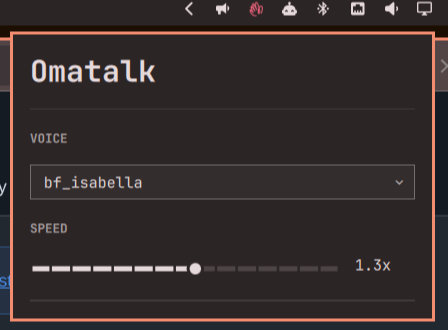
wl-paste --primary), the clipboard if nothing's selected.Click the bar icon for voice and speed — it auto-saves, and the next
utterance picks it up, no restart needed. omatalk config get/set/voices does the same from a terminal or a
script. Everything else is two files, edited by hand.
~/.config/omatalk/config.toml is
entirely optional. Missing the file, Omatalk just runs on defaults. Point voice at any
name from the list above, tune speed, save.
voice = "af_heart"
speed = 1.0
F8 answers
F9: voxtype's dictation key speaks to the machine, F8 speaks back. The installer asks before adding
this line to ~/.config/hypr/bindings.lua; say no and paste it yourself.
o.bind("F8", "Omatalk", "omatalk speak")
Kokoro-82M ships packs across nine languages; Omatalk speaks
English only for now: American and British, eleven female and nine male US voices, four and four UK.
Set voice = "…"
in config.toml
to any name below. af_heart is the default. Every clip is the same line, rendered
through the pipeline Omatalk actually runs: Kokoro-82M, ONNX Runtime, CPU.
The megaphone stays in the same place on the Omarchy bar. Its color tells you whether Omatalk is ready, reading your selection, or disconnected. If the Daemon is not installed yet, the same icon stays in the normal bar color and the panel links to these install instructions.


speak / stop / status, plus follow so the bar can track state.pw-cat streams raw PCM straight over stdin as each batch is synthesized — no staged WAV files, layering over whatever else is playing. One player process per Utterance.~/.local/share/omatalk/.One hotkey press is a one-shot client; the daemon holds the model warm from login so nothing pays a cold-load tax mid-sentence.
┌───────────────────┐   ┌─────────────────┐
│ bindings.lua (F8) │──▶│ one-shot client │
└───────────────────┘   └─────────────────┘
                                 │
                                 ▼
                    Unix socket (omatalk.sock)
                                 │
                                 ▼
┌───────────────────────────────────────────┐
│      omatalk daemon · systemd --user      │
│ capture:  wl-paste --primary → wl-paste   │
│ g2p:      misaki (Rust port) → phonemes   │
│ batches:  short first, then up to 510     │
│ engine:   Kokoro-82M · ONNX Runtime · CPU │
│ player:   pw-cat → PipeWire (streamed)    │
└───────────────────────────────────────────┘
The MVP scope stayed narrow on purpose. Four pieces have shipped; the remaining work is next, in roughly the order it will land.
config.toml — the next utterance binds the change, no restart. The same surface is scriptable: omatalk config get/set/voices.omatalk daemon is the Daemon, and every other command is the CLI. The install no longer needs a Python environment. The socket, config.toml, and the bar plugin stay the same.omatalk-bin so Omarchy can install Omatalk from the AUR. The curl installer stays until that package ships.The neural voice is Kokoro-82M by hexgrad. Omatalk downloads the ONNX export published by kokoro-onnx by thewh1teagle, and reads text with a Rust port of misaki, Kokoro's G2P library.
Omatalk is built for Omarchy by DHH. The bar plugin, the F8/F9 pairing, and the installer all sit on that desktop. Source: github.com/omacom/omarchy.